
Download RightHair – Free AI Hairstyle Try‑On Tool for Windows, Mac, Android & iOS
Overview
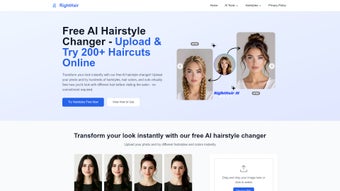
RightHair is a browser‑based, AI‑driven hairstyle simulation platform that lets anyone experiment with a wide variety of haircuts, colors, and textures without ever stepping into a salon. By uploading a single front‑facing selfie, the intelligent engine analyses facial features, hairline, and head shape, then projects over 200 meticulously crafted styles directly onto the portrait. The result is a photorealistic preview that feels almost like a virtual mirror.
Because the service runs completely in HTML5 and WebGL, there is no need for bulky installers, plug‑ins, or platform‑specific binaries. Users can access RightHair from any modern browser on a desktop, laptop, tablet, or smartphone, making it a truly cross‑device solution. The platform is positioned as both a fun pastime for casual users and a practical planning tool for professionals such as wedding stylists, career coaches, and beauty consultants.
Privacy is baked into the architecture: each uploaded image is encrypted during transmission, processed in memory, and automatically erased from the server after 24 hours, ensuring that personal photos never become permanent data. In addition, the service is offered at zero cost, with no hidden subscriptions or trial periods, which lowers the barrier for anyone curious about a new look. Whether you’re a student preparing for a presentation, a bride‑to‑be visualising wedding day hair, or a stylist demonstrating options to a client, RightHair delivers a seamless, secure, and cost‑free experience that brings the future of beauty experimentation to your fingertips.
Key Features
- AI‑Powered Real‑Time Rendering: Instantly generates photorealistic overlays that adapt to facial contours and lighting conditions.
- 200+ Distinct Styles & Colors: Includes classic cuts, modern trends, braids, curls, and even stylised anime‑inspired looks.
- One‑Click Photo Upload: Drag‑and‑drop or file‑picker interface works on any device, with automatic image optimisation.
- No Download Required: Fully web‑based; runs in Chrome, Firefox, Safari, Edge, or any HTML5‑compatible browser.
- Privacy‑First Architecture: Images are encrypted in transit, processed in‑memory, and auto‑deleted after 24 hours.
- Multi‑Purpose Use Cases: Ideal for personal experimentation, wedding planning, professional portfolio building, and client consultations.
- Cross‑Device Compatibility: Optimised for Windows 10/11, macOS Monterey+, Linux, Android 9+, and iOS 13+.
- Free Core Access: All primary features are completely free; premium filters may be introduced in the future.
- Instant Color Adjustment Slider: Test shades from natural blacks to vivid blues with a single drag.
- Save & Share Options: Export the final composition as a high‑resolution PNG or share via a secure link to social platforms.
Installation, Usage & Compatibility
Getting Started – No Installation Needed
The onboarding experience is designed to be frictionless. Simply navigate to righthair.com using any up‑to‑date browser. Click the prominent “Upload Photo” button, select a clear, front‑facing selfie, and let the AI engine do the heavy lifting.
Within seconds a gallery of suggested hairstyles appears beneath the image. Users can click any thumbnail to apply the style, then fine‑tune length, volume, and color intensity using intuitive sliders. The interface provides real‑time feedback, so you can instantly see how a longer bob compares to a layered pixie cut.
Once a look is perfected, a “Download PNG” button saves the result locally, while a “Share Link” option creates a temporary URL that can be sent to friends or stylists for further feedback. A short, on‑screen tutorial video and contextual tooltips guide first‑time visitors, ensuring that even non‑technical users feel confident navigating the platform.
System Compatibility – Powered by the Browser
Because RightHair is built entirely on standard web technologies (HTML5, CSS3, WebGL, and JavaScript), it is compatible with virtually any operating system that supports a modern browser. Supported environments include:
- Windows 10/11 – Chrome, Edge, Firefox, or Safari (via Windows 11 Safari preview).
- macOS Monterey and later – Chrome, Safari, Firefox, or Edge.
- Linux distributions – Any recent Chromium‑based or Firefox browser.
- Android 9+ – Chrome, Firefox, or the native Android WebView.
- iOS 13+ – Safari, Chrome, or Firefox (all using WebKit under the hood).
The only technical requirement is a stable internet connection with a minimum bandwidth of 3 Mbps to ensure smooth real‑time rendering. The responsive layout automatically adapts to touch‑screen gestures on smartphones and tablets, while mouse and keyboard controls remain available on desktops and laptops. No additional plugins, extensions, or native app installations are required, which simplifies maintenance and reduces potential security vulnerabilities.
Pros and Cons
- Pros
- Completely free with no registration or hidden fees.
- AI rendering is fast, accurate, and visually impressive.
- Extensive library of over 200 styles, including niche and culturally specific looks.
- Strong privacy safeguards – images are encrypted and deleted after 24 hours.
- Works on every major operating system and device via the browser.
- Easy sharing options for social media, email, or direct client communication.
- Cons
- Requires a constant internet connection; offline use is not possible.
- Customization beyond preset styles (e.g., creating a completely new cut) is limited.
- High‑resolution rendering can be slower on older or low‑powered devices.
- No dedicated native mobile app yet, though the web version is fully responsive.
- Color accuracy depends on the lighting and quality of the original uploaded photo.
FAQ
Is RightHair really free to use?
Yes. All core functionalities—including photo upload, style selection, color adjustment, and result download—are completely free with no subscription or hidden charges.
How secure is my uploaded photo?
Your image is transmitted over HTTPS, processed in memory, and automatically erased from our servers after 24 hours. No personal data is stored beyond this temporary window.
Can I use RightHair on my smartphone or tablet?
Absolutely. The web app is fully responsive and works on any Android or iOS device with a modern browser.
What if the hairstyle I want isn’t in the library?
The library is continuously updated based on user feedback. You can submit suggestions through the “Feedback” button, and popular requests are often added in future releases.
Do I need to install any plugins or extensions?
No. RightHair runs entirely in the browser using standard web technologies, so there’s nothing extra to install.
Conclusion & Call to Action
RightHair stands out as a powerful, free, and privacy‑focused solution for anyone who wants to explore new hairstyles without the commitment of a physical trial. Its AI‑driven engine delivers quick, realistic previews, while the extensive style catalog satisfies both casual users and beauty professionals. Because the tool is completely web‑based, you can access it from any device—whether you’re planning a wedding look on a laptop or testing a bold color change on a phone during a commute.
The seamless experience, strong data protection, and zero cost make RightHair a must‑try for beauty enthusiasts, stylists, and anyone who values convenience. Ready to see yourself in a fresh new look? Visit RightHair now, upload your photo, and start experimenting—your perfect hairstyle is just a click away.
RightHair delivers a surprisingly rich set of features for a completely free web app. The AI rendering is impressively fast, and the privacy policy gives me confidence to upload personal photos. The only drawback is the reliance on an internet connection, but for a cloud‑based service that’s expected. Overall, a solid 4.5‑star experience.



.png)



